# I/O Riot NG (aka ior)
 I/O Riot NG is an experiments with BPF. This program traces for synchronous I/O syscalls and then analyses the time taken for each of those syscalls. This is especially useful for drawing FlameGraphs like these:
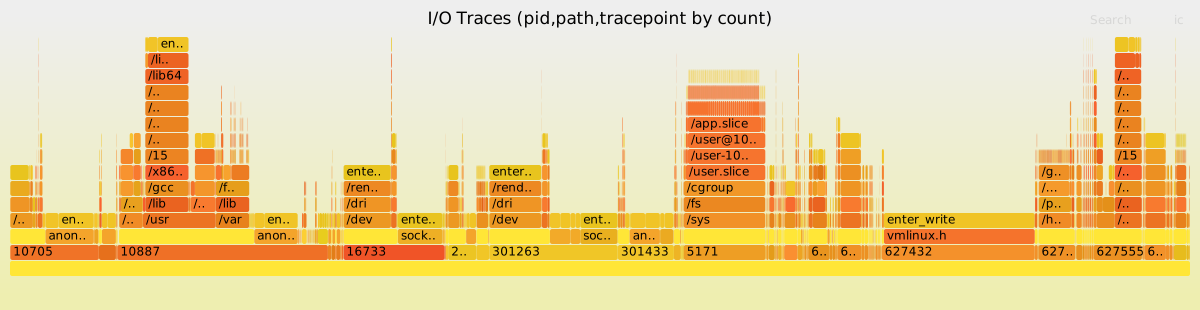 Maybe this is a spiritual successor of one of my previous projects, I/O Riot https://codeberg.org/snonux/ioriot, the latter was based on SystemTap and C. The NG is based on Go, C and BPF (via libbpfgo).
This works only on Linux!
## Requirements
- Go 1.26 or newer (ior relies on cgo via libbpfgo).
## Timing Semantics
Each reported event pair has two timing counters:
- `durationNs`: syscall runtime on the same thread (`exit(current) - enter(current)`).
- `durationToPrevNs`: inter-syscall gap on the same thread (`enter(current) - exit(previous)`).
Important details:
- `durationToPrevNs` is tracked per `tid` (thread), not globally across all threads.
- The first observed syscall pair for a thread has `durationToPrevNs = 0` because there is no prior exit timestamp.
- `durationToPrevNs` is attributed to the current syscall pair (the one whose `enter` closes the gap).
- There is no separate "idle" pseudo-event bucket; use the `durationToPrev` count field when aggregated flamegraph output should emphasize inter-syscall time.
## Fedora
To get this running on Fedora 42, run:
```shell
mkdir ~/git
git clone https://codeberg.org/snonux/ior
git clone https://github.com/aquasecurity/libbpfgo
sudo dnf install -y golang clang bpftool elfutils-libelf-devel zlib-static glibc-static libzstd-static
cd libbpfgo
make
make libbpfgo-static
```
Need libelf static, which isn't in any repos. So we need to compile it ourselves.
```
sudo dnf install rpmdevtools dnf-utils
dnf download --source elfutils-libelf
rpm -ivh elfutils-*.src.rpm
cd ~
sudo dnf builddep rpmbuild/SPECS/*.spec
cd ~/rpmbuild/SPECS
rpmbuild -ba *.spec
mkdir ~/src
tar -C ~/src -xvjpf ~/rpmbuild/SOURCES/elfutils-*.tar.bz2
cd ~/src/elfutils-*
rm -Rf ~/rpmbuild
./configure
make
sudo cp -v ./libelf/libelf.a /usr/lib64/
```
## TUI Flamegraphs
Flamegraphs are available only inside the TUI dashboard.
Use `-fields` to change the stack order and `-count` to choose the metric.
The default stack order is `comm,path,tracepoint` (bottom to top).
## TUI Hotkeys
The TUI has two key scopes:
- Global hotkeys: available from dashboard screens.
- Dashboard hotkeys: behavior that depends on the active dashboard tab (especially `6:Stream`).
Help visibility:
- `H`: toggle bottom help sections on/off.
- By default, help is hidden and the bottom hint shows `press H for help`.
### Global Hotkeys
- `tab`: next dashboard tab.
- `shift+tab`: previous dashboard tab.
- `1`: `Overview` tab.
- `2`: `Syscalls` tab.
- `3`: `Files` tab.
- `4`: `Processes` tab.
- `5`: `Latency+Gaps` tab.
- `6`: `Stream` tab.
- `7`: `Stream` tab (alias).
- `e`: export snapshot summaries CSV (`ior-snapshot-.csv`) in current working directory.
- `p`: re-open process selector (PID selection flow).
- `t`: open TID selector flow.
- `o`: open probe selection/toggling dialog.
- `r`: refresh dashboard snapshot.
- `q` or `ctrl+c`: quit.
### Dashboard / Tab-Specific Hotkeys
- `d` in `3:Files`: toggle directory-grouped files view.
- `j/k` or `up/down` in list-like tabs (`2:Syscalls`, `3:Files`, `4:Processes`): scroll list.
`left/right` and `h/l` do not switch tabs. In `6:Stream` paused mode they move selected column.
### 6:Stream Hotkeys and Behavior
`6:Stream` has two modes:
- Live mode (`paused=false`): rows update continuously.
- Pause mode (`paused=true`): selection/cell/filter/search/export workflows are enabled.
Core controls:
- `space`: toggle live/pause.
- `g`/`G`: jump to top/tail.
- `c`: clear stream filters.
- `f`: open advanced filter modal.
- `j/k` or `up/down`: move selected row in pause mode; scroll in live mode.
- `left/right` or `h/l`: move selected column in pause mode.
#### Enter-Based Filter Stack (Pause Mode)
In pause mode, `enter` on the selected cell pushes a new filter onto a stack and immediately re-filters the current ring buffer snapshot. Filters are stackable.
- String columns use case-insensitive substring match:
- `Comm` -> `comm~`
- `Syscall` -> `syscall~`
- `File` -> `file~`
- Numeric exact match:
- `PID`, `TID`, `FD`, `Ret`, `Bytes`
- Numeric threshold (`>=`):
- `Latency` -> `latency>=selected_value`
- `Gap` -> `gap>=selected_value`
Undo:
- `esc` in pause mode pops the most recent filter from the stack (LIFO).
- Repeated `esc` keeps undoing until no stacked filters remain.
#### Regex Search (Pause Mode)
- `/`: open regex prompt and search forward.
- `?`: open regex prompt and search backward.
- Search checks all stream columns/fields and wraps around ring-buffer rows.
- `n`: next match in the same direction as last `/` or `?`.
- `N`: previous match (opposite direction).
#### Stream CSV Export (Pause Mode)
- `x`: quick export filtered stream rows to CSV (`ior-stream-.csv`).
- `X`: export filtered stream rows to CSV with filename prompt.
- `E`: open last stream-exported CSV in foreground editor (`SUDO_EDITOR` -> `VISUAL` -> `EDITOR` -> fallback `vi`).
Important export distinction:
- `e` exports dashboard snapshot summaries.
- `x`/`X` export raw stream rows currently visible under active stream filters.
Maybe this is a spiritual successor of one of my previous projects, I/O Riot https://codeberg.org/snonux/ioriot, the latter was based on SystemTap and C. The NG is based on Go, C and BPF (via libbpfgo).
This works only on Linux!
## Requirements
- Go 1.26 or newer (ior relies on cgo via libbpfgo).
## Timing Semantics
Each reported event pair has two timing counters:
- `durationNs`: syscall runtime on the same thread (`exit(current) - enter(current)`).
- `durationToPrevNs`: inter-syscall gap on the same thread (`enter(current) - exit(previous)`).
Important details:
- `durationToPrevNs` is tracked per `tid` (thread), not globally across all threads.
- The first observed syscall pair for a thread has `durationToPrevNs = 0` because there is no prior exit timestamp.
- `durationToPrevNs` is attributed to the current syscall pair (the one whose `enter` closes the gap).
- There is no separate "idle" pseudo-event bucket; use the `durationToPrev` count field when aggregated flamegraph output should emphasize inter-syscall time.
## Fedora
To get this running on Fedora 42, run:
```shell
mkdir ~/git
git clone https://codeberg.org/snonux/ior
git clone https://github.com/aquasecurity/libbpfgo
sudo dnf install -y golang clang bpftool elfutils-libelf-devel zlib-static glibc-static libzstd-static
cd libbpfgo
make
make libbpfgo-static
```
Need libelf static, which isn't in any repos. So we need to compile it ourselves.
```
sudo dnf install rpmdevtools dnf-utils
dnf download --source elfutils-libelf
rpm -ivh elfutils-*.src.rpm
cd ~
sudo dnf builddep rpmbuild/SPECS/*.spec
cd ~/rpmbuild/SPECS
rpmbuild -ba *.spec
mkdir ~/src
tar -C ~/src -xvjpf ~/rpmbuild/SOURCES/elfutils-*.tar.bz2
cd ~/src/elfutils-*
rm -Rf ~/rpmbuild
./configure
make
sudo cp -v ./libelf/libelf.a /usr/lib64/
```
## TUI Flamegraphs
Flamegraphs are available only inside the TUI dashboard.
Use `-fields` to change the stack order and `-count` to choose the metric.
The default stack order is `comm,path,tracepoint` (bottom to top).
## TUI Hotkeys
The TUI has two key scopes:
- Global hotkeys: available from dashboard screens.
- Dashboard hotkeys: behavior that depends on the active dashboard tab (especially `6:Stream`).
Help visibility:
- `H`: toggle bottom help sections on/off.
- By default, help is hidden and the bottom hint shows `press H for help`.
### Global Hotkeys
- `tab`: next dashboard tab.
- `shift+tab`: previous dashboard tab.
- `1`: `Overview` tab.
- `2`: `Syscalls` tab.
- `3`: `Files` tab.
- `4`: `Processes` tab.
- `5`: `Latency+Gaps` tab.
- `6`: `Stream` tab.
- `7`: `Stream` tab (alias).
- `e`: export snapshot summaries CSV (`ior-snapshot-.csv`) in current working directory.
- `p`: re-open process selector (PID selection flow).
- `t`: open TID selector flow.
- `o`: open probe selection/toggling dialog.
- `r`: refresh dashboard snapshot.
- `q` or `ctrl+c`: quit.
### Dashboard / Tab-Specific Hotkeys
- `d` in `3:Files`: toggle directory-grouped files view.
- `j/k` or `up/down` in list-like tabs (`2:Syscalls`, `3:Files`, `4:Processes`): scroll list.
`left/right` and `h/l` do not switch tabs. In `6:Stream` paused mode they move selected column.
### 6:Stream Hotkeys and Behavior
`6:Stream` has two modes:
- Live mode (`paused=false`): rows update continuously.
- Pause mode (`paused=true`): selection/cell/filter/search/export workflows are enabled.
Core controls:
- `space`: toggle live/pause.
- `g`/`G`: jump to top/tail.
- `c`: clear stream filters.
- `f`: open advanced filter modal.
- `j/k` or `up/down`: move selected row in pause mode; scroll in live mode.
- `left/right` or `h/l`: move selected column in pause mode.
#### Enter-Based Filter Stack (Pause Mode)
In pause mode, `enter` on the selected cell pushes a new filter onto a stack and immediately re-filters the current ring buffer snapshot. Filters are stackable.
- String columns use case-insensitive substring match:
- `Comm` -> `comm~`
- `Syscall` -> `syscall~`
- `File` -> `file~`
- Numeric exact match:
- `PID`, `TID`, `FD`, `Ret`, `Bytes`
- Numeric threshold (`>=`):
- `Latency` -> `latency>=selected_value`
- `Gap` -> `gap>=selected_value`
Undo:
- `esc` in pause mode pops the most recent filter from the stack (LIFO).
- Repeated `esc` keeps undoing until no stacked filters remain.
#### Regex Search (Pause Mode)
- `/`: open regex prompt and search forward.
- `?`: open regex prompt and search backward.
- Search checks all stream columns/fields and wraps around ring-buffer rows.
- `n`: next match in the same direction as last `/` or `?`.
- `N`: previous match (opposite direction).
#### Stream CSV Export (Pause Mode)
- `x`: quick export filtered stream rows to CSV (`ior-stream-.csv`).
- `X`: export filtered stream rows to CSV with filename prompt.
- `E`: open last stream-exported CSV in foreground editor (`SUDO_EDITOR` -> `VISUAL` -> `EDITOR` -> fallback `vi`).
Important export distinction:
- `e` exports dashboard snapshot summaries.
- `x`/`X` export raw stream rows currently visible under active stream filters.