# I/O Riot NG (aka ior)
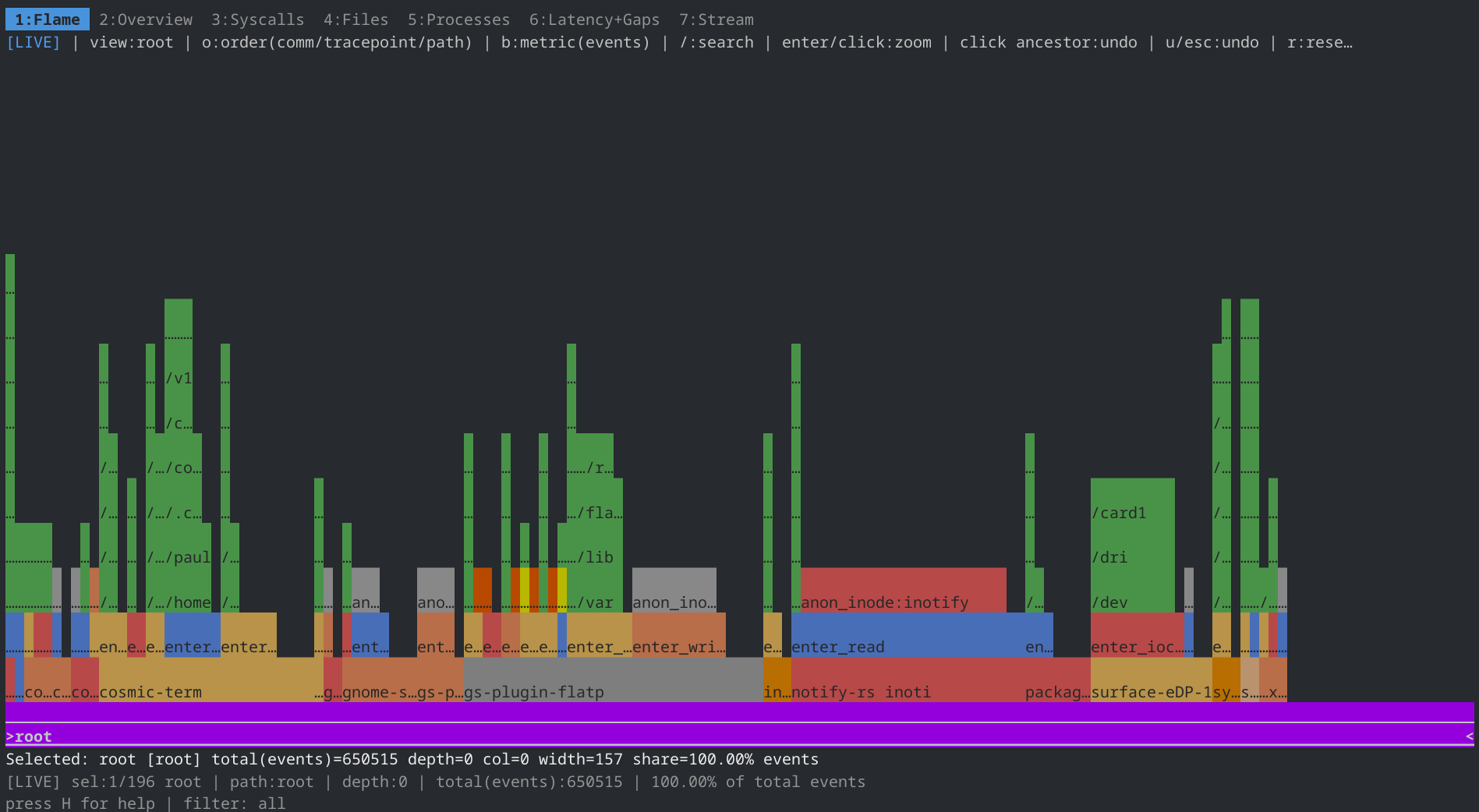
 I/O Riot NG is an experiment with BPF. It traces synchronous I/O syscalls and analyses how long each one took. Useful for drawing FlameGraphs like these:
 A spiritual successor to one of my previous projects, I/O Riot (https://codeberg.org/snonux/ioriot), which was based on SystemTap and C. The NG is based on Go, C, and BPF (via libbpfgo).
Linux only.
You can read a blog post series about this here: https://foo.zone/gemfeed/2026-05-08-unveiling-ior-ng-part-1.html
## Demo
A short guided tour with animated GIFs of every major surface lives in [`docs/tutorial/tutorial.md`](./docs/tutorial/tutorial.md). Two teasers:
**Startup, the PID picker:** `sudo ./ior` opens a searchable process list. Navigate with arrow keys, filter by typing, press `Enter` to start tracing. The dashboard appears right after.
A spiritual successor to one of my previous projects, I/O Riot (https://codeberg.org/snonux/ioriot), which was based on SystemTap and C. The NG is based on Go, C, and BPF (via libbpfgo).
Linux only.
You can read a blog post series about this here: https://foo.zone/gemfeed/2026-05-08-unveiling-ior-ng-part-1.html
## Demo
A short guided tour with animated GIFs of every major surface lives in [`docs/tutorial/tutorial.md`](./docs/tutorial/tutorial.md). Two teasers:
**Startup, the PID picker:** `sudo ./ior` opens a searchable process list. Navigate with arrow keys, filter by typing, press `Enter` to start tracing. The dashboard appears right after.
 **Live flamegraph tab:** Once tracing, tab `1` shows a live flamegraph that rebuilds in real time as I/O events arrive. Bars grow and shift with the workload. This is the default landing tab.
 The demo is fully reproducible: `mage installDemoTools` once, then `sudo -v && mage demo` regenerates every GIF and screenshot. See the [tutorial](./docs/tutorial/tutorial.md) for the full walkthrough.
> **Note:** `mage installDemoTools` uses `dnf` to install `ttyd` and is only supported on Fedora / RHEL / Rocky / Alma Linux. On other distros install `ttyd` manually (binary releases are on its GitHub page) and then `go install github.com/charmbracelet/vhs@latest` for VHS; `mage demo` will find them on `PATH`.
## Requirements
- Docker and a Linux host with a BTF-enabled kernel (`/sys/kernel/btf/vmlinux` present).
- Go (any 1.x version on `PATH`) for installing the [Mage](https://magefile.org) build tool.
## Install Mage
The build orchestration uses Mage. Install the `mage` binary once before any of
the build commands below:
```shell
go install github.com/magefile/mage@latest
```
Make sure `$(go env GOPATH)/bin` (typically `$HOME/go/bin`) is on your `PATH`.
## Build
Builds a fully static `ior` binary inside a Rocky Linux 9 container and writes
it to the repo root. No local Go, clang, or libbpfgo setup required:
```shell
mage buildDocker
```
First run takes ~15–20 minutes to build the image; subsequent runs reuse the
cached image and finish in under a minute. To skip the image rebuild:
```shell
./scripts/build-with-docker.sh --run
```
To target hosts with the older glibc on RHEL/Rocky/Alma 8, build a sibling
binary called `ior.el8` from a Rocky Linux 8 container:
```shell
mage buildDockerEl8
```
For contributors who need a native build (Fedora / Rocky Linux 9), see
[docs/build-rocky-linux-9.md](./docs/build-rocky-linux-9.md) and
[AGENTS.md](./AGENTS.md).
## Compile once, run everywhere
Build on one machine, then `scp ior other-host:/usr/local/bin/` and run it
anywhere. The binary is fully statically linked and uses libbpf CO-RE
(Compile-Once, Run-Everywhere) to adapt field offsets to the target kernel's
BTF at load time. No recompile per host or kernel version needed.
See [docs/build-rocky-linux-9.md](./docs/build-rocky-linux-9.md) for the full
explanation.
## TUI
Press **H** inside the dashboard to toggle the built-in help panel. Tabs are
reachable with **tab/shift+tab** or number keys **1–7**. For the full hotkey
reference, recording modes, and the `.ior.zst` vs Parquet trade-off see the
[tutorial](./docs/tutorial/tutorial.md).
The demo is fully reproducible: `mage installDemoTools` once, then `sudo -v && mage demo` regenerates every GIF and screenshot. See the [tutorial](./docs/tutorial/tutorial.md) for the full walkthrough.
> **Note:** `mage installDemoTools` uses `dnf` to install `ttyd` and is only supported on Fedora / RHEL / Rocky / Alma Linux. On other distros install `ttyd` manually (binary releases are on its GitHub page) and then `go install github.com/charmbracelet/vhs@latest` for VHS; `mage demo` will find them on `PATH`.
## Requirements
- Docker and a Linux host with a BTF-enabled kernel (`/sys/kernel/btf/vmlinux` present).
- Go (any 1.x version on `PATH`) for installing the [Mage](https://magefile.org) build tool.
## Install Mage
The build orchestration uses Mage. Install the `mage` binary once before any of
the build commands below:
```shell
go install github.com/magefile/mage@latest
```
Make sure `$(go env GOPATH)/bin` (typically `$HOME/go/bin`) is on your `PATH`.
## Build
Builds a fully static `ior` binary inside a Rocky Linux 9 container and writes
it to the repo root. No local Go, clang, or libbpfgo setup required:
```shell
mage buildDocker
```
First run takes ~15–20 minutes to build the image; subsequent runs reuse the
cached image and finish in under a minute. To skip the image rebuild:
```shell
./scripts/build-with-docker.sh --run
```
To target hosts with the older glibc on RHEL/Rocky/Alma 8, build a sibling
binary called `ior.el8` from a Rocky Linux 8 container:
```shell
mage buildDockerEl8
```
For contributors who need a native build (Fedora / Rocky Linux 9), see
[docs/build-rocky-linux-9.md](./docs/build-rocky-linux-9.md) and
[AGENTS.md](./AGENTS.md).
## Compile once, run everywhere
Build on one machine, then `scp ior other-host:/usr/local/bin/` and run it
anywhere. The binary is fully statically linked and uses libbpf CO-RE
(Compile-Once, Run-Everywhere) to adapt field offsets to the target kernel's
BTF at load time. No recompile per host or kernel version needed.
See [docs/build-rocky-linux-9.md](./docs/build-rocky-linux-9.md) for the full
explanation.
## TUI
Press **H** inside the dashboard to toggle the built-in help panel. Tabs are
reachable with **tab/shift+tab** or number keys **1–7**. For the full hotkey
reference, recording modes, and the `.ior.zst` vs Parquet trade-off see the
[tutorial](./docs/tutorial/tutorial.md).