# Task Samurai

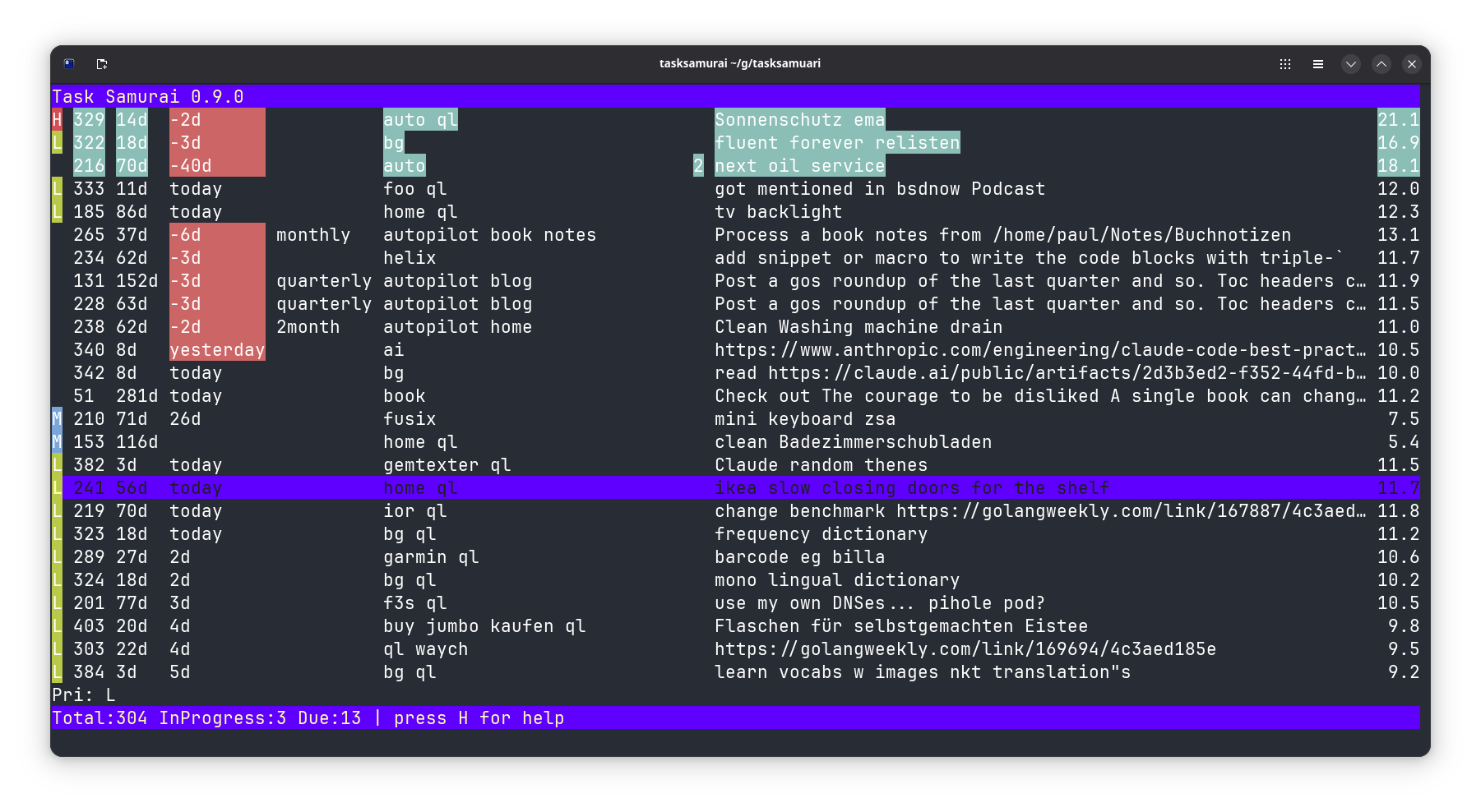
 Task Samurai is a fast terminal interface for [Taskwarrior](https://taskwarrior.org/) written in Go using the [Bubble Tea](https://github.com/charmbracelet/bubbletea) framework. It shows your tasks in a table and lets you manage them without leaving your keyboard.
## Why does this exist?
- I wanted to tinker with agentic coding.
- I wanted a faster UI for Taskwarrior than other options like vit which is Python based.
- I wanted something built with Bubble Tea but never had time to deep dive into it.
## How it works
Task Samurai invokes the `task` command to read and modify tasks. The tasks are displayed in a Bubble Tea table where each row represents a task. Hotkeys trigger Taskwarrior commands such as starting, completing or annotating tasks. The UI refreshes automatically after each action so the table is always up to date.
## Hotkeys
Press `H` to view all available hotkeys.
Example: press `+`, type `Buy milk` and hit Enter to add a new task called "Buy milk".
## Screenshot
## Installation
There are two ways to install the `tasksamurai` command:
```bash
go install codeberg.org/snonux/tasksamurai/cmd/tasksamurai@latest
```
Alternatively, clone this repository and run:
```bash
go-task install
```
The second method requires [go-task](https://taskfile.dev/) to be installed.
### Usage
```bash
# Start with default pending tasks
tasksamurai
# Start with a Taskwarrior filter
tasksamurai +tag status:pending
tasksamurai project:work due:today
tasksamurai pri:H
# Any valid Taskwarrior filter can be passed as arguments
```
### Flags
- `--disco`: start Task Samurai in disco mode, changing the theme every time a task is modified.
Task Samurai is a fast terminal interface for [Taskwarrior](https://taskwarrior.org/) written in Go using the [Bubble Tea](https://github.com/charmbracelet/bubbletea) framework. It shows your tasks in a table and lets you manage them without leaving your keyboard.
## Why does this exist?
- I wanted to tinker with agentic coding.
- I wanted a faster UI for Taskwarrior than other options like vit which is Python based.
- I wanted something built with Bubble Tea but never had time to deep dive into it.
## How it works
Task Samurai invokes the `task` command to read and modify tasks. The tasks are displayed in a Bubble Tea table where each row represents a task. Hotkeys trigger Taskwarrior commands such as starting, completing or annotating tasks. The UI refreshes automatically after each action so the table is always up to date.
## Hotkeys
Press `H` to view all available hotkeys.
Example: press `+`, type `Buy milk` and hit Enter to add a new task called "Buy milk".
## Screenshot

## Installation
There are two ways to install the `tasksamurai` command:
```bash
go install codeberg.org/snonux/tasksamurai/cmd/tasksamurai@latest
```
Alternatively, clone this repository and run:
```bash
go-task install
```
The second method requires [go-task](https://taskfile.dev/) to be installed.
### Usage
```bash
# Start with default pending tasks
tasksamurai
# Start with a Taskwarrior filter
tasksamurai +tag status:pending
tasksamurai project:work due:today
tasksamurai pri:H
# Any valid Taskwarrior filter can be passed as arguments
```
### Flags
- `--disco`: start Task Samurai in disco mode, changing the theme every time a task is modified.